Documentation

Typo3 CMS Connector
For a general introduction to the connector, please refer to RheinInsights Typo3 Enterprise Search and RAG Connector.
Typo3 Configuration
Our connector brings its own REST API for crawling. You can find the package in the connector folder below additional/typo3/rheininsights_typo3_content_connector_api-<version>.zip. You can inspect the php sources as needed before installing.
In order to use our extension, do the following:
Open your Typo3 administration backend
Open extensions
Click on upload extension
And upload the zip as provided
Active the extension, if needed.
Also click on Maintenance and flush the caches by clicking on flush TYPO3 and PHP cache.
Crawl User
The connector needs a crawl user which
has the permissions to see all relevant contents,
has access to the frontend users, frontend groups and their relationships, if you plan to use secure search
Administrative privileges are not needed.
MFA must stay deactivated.
Content Source Configuration
The content source configuration of the connector comprises the following mandatory configuration fields.
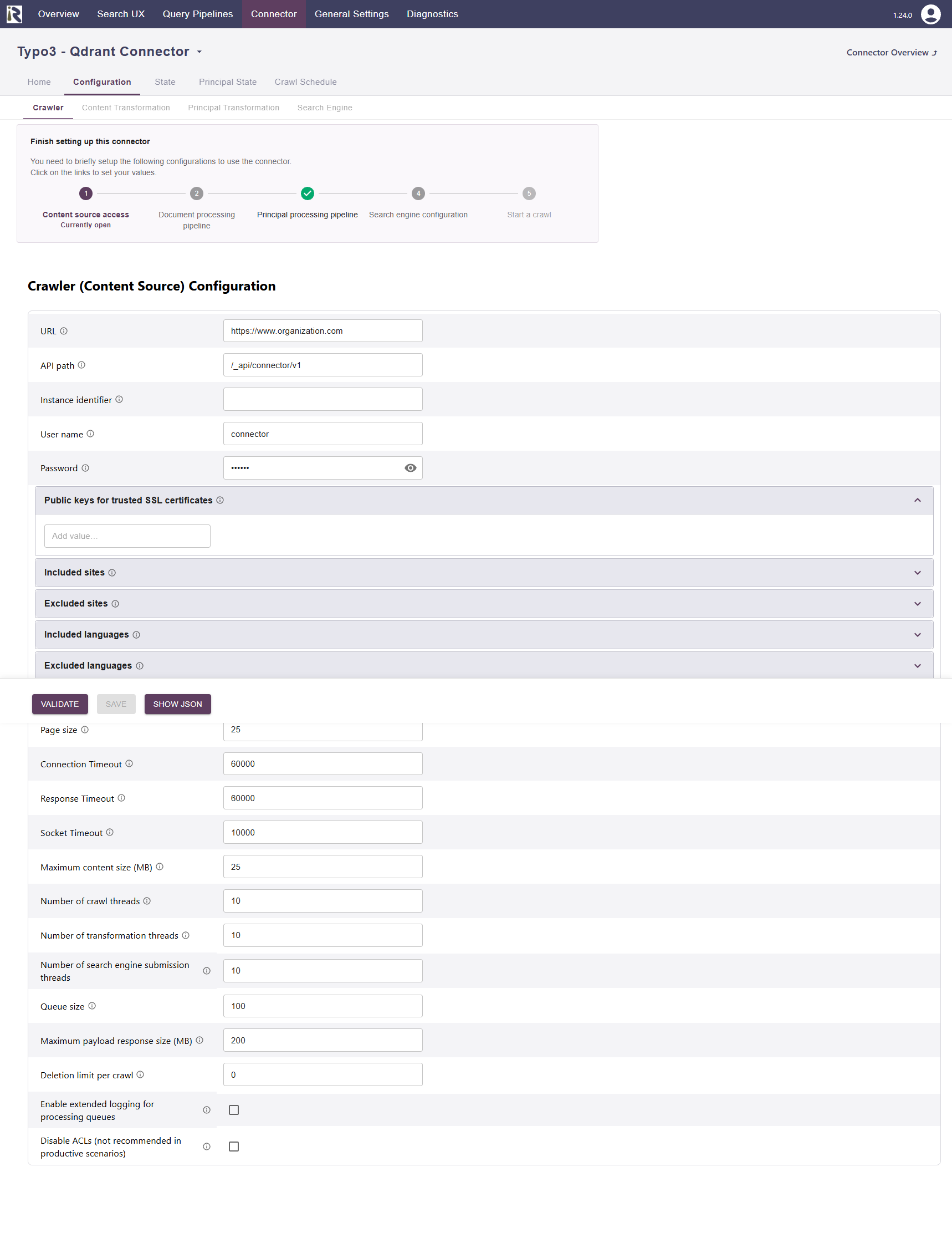
URL, which is the fully qualified domain name or host name to the Typo3 instance’s root.
API path. Path of the TYPO3 extension "content_connector_api" as configured in its extension configuration, see above. The default value is /_api/connector/v1
Instance identifier. Use this to distinguish users and groups in environments where you want to crawl multiple different Typo3 instances.
Username: is the username of the crawl user
Password: is the password for this crawl user
Public keys for SSL certificates: this configuration is needed, if you run the environment with self-signed certificates, or certificates which are not known to the Java key store.
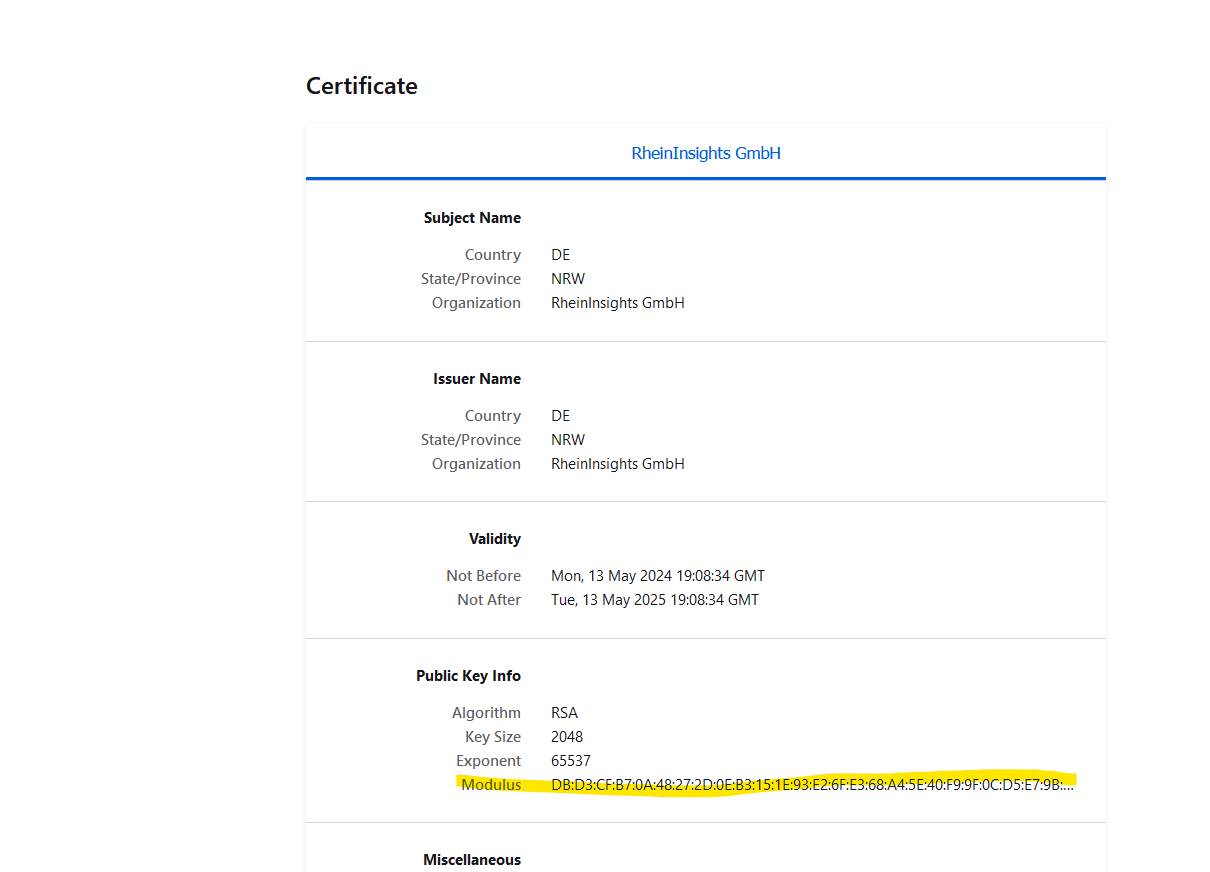
We use a straight-forward approach to validate SSL certificates. In order to render a certificate valid, add the modulus of the public key into this text field. You can access this modulus by viewing the certificate within the browser.
Included sites: provide site identifiers which you would like to only have crawled. If left empty, the entire instance (while respective the excluded sites below) is crawled.
Excluded sites: provide site identifiers which you would not want to have crawled. If left empty, the entire instance (while respective the included sites) is crawled.
Included languages. Allows for specifying language codes or ids for indexing. If left empty, all language versions (while respecting the excluded languages) are crawled.
Excluded languages: provide language identifiers or ids which you would not want to have crawled. If left empty, the entire instance (while respective the included languages) is crawled.
Excluded pages. Here you can specify individual pages, which you would like to exclude from crawling.
Page size. This is the number of pages fetched in one API request.
Response timeout (ms). Defines how long the connector until an API call is aborted and the operation be marked as failed.
Connection timeout (ms). Defines how long the connector waits for a connection for an API call.
Socket timeout (ms). Defines how long the connector waits for receiving all data from an API call.
The general settings are described at General Crawl Settings and you can leave these with its default values.
After entering the configuration parameters, click on validate. This validates the content crawl configuration directly against the content source. If there are issues when connecting, the validator will indicate these on the page. Otherwise, you can save the configuration and continue with Content Transformation configuration.
Limitations for Incremental Crawls and Recommended Crawl Schedules
Our API offers a change log. This means that incremental crawls can detect new and changed posts, articles and pages. However, deleted articles items will not be detected in incremental crawls.
Therefore, we recommend to configure
incremental crawls to run every 15-30 minutes,
as well as a weekly full scan of the documents of the instance.
Principal crawls can be scheduled to run once or twice a day, depending on your use case
For more information see Crawl Scheduling .