Documentation

Microsoft Dynamics 365 Cloud
For a general introduction to the connector, please refer to RheinInsights Microsoft Dynamics 365 Cloud Enterprise Search and RAG Connector. This connector supports Microsoft Dynamics 365 Cloud.
Entra Id Configuration
Our Microsoft Dynamics 365 Connector supports delegated authentication via Entra Id against Dynamics and uses the REST APIs provided by your instance. Therefore, it uses a crawl user for accessing the data.
Entra Id Application Registration
Navigate to your Entra Id
Click on App registrations
Click on New registration
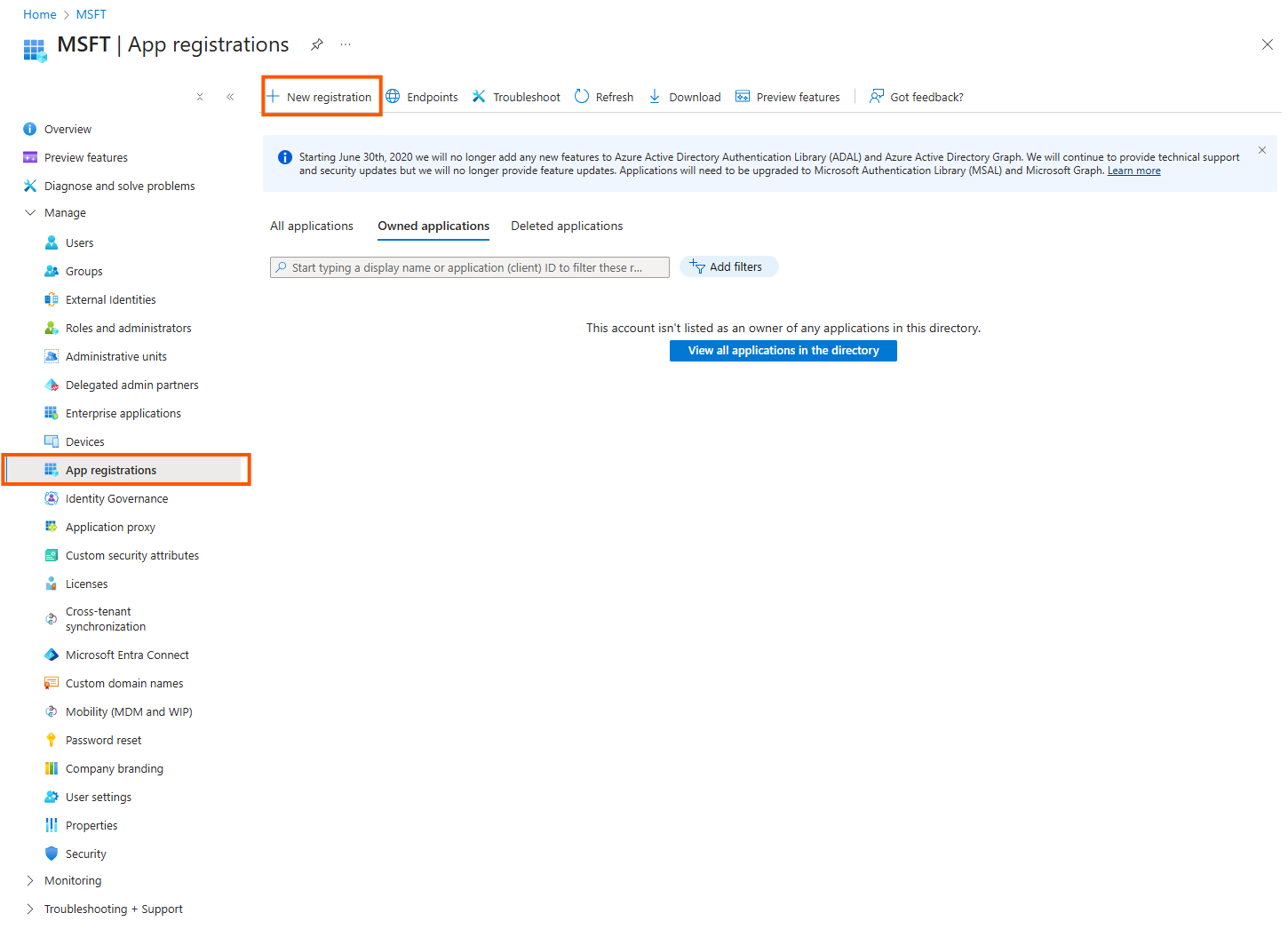
Give it a name and leave the other options as is. Click on Register
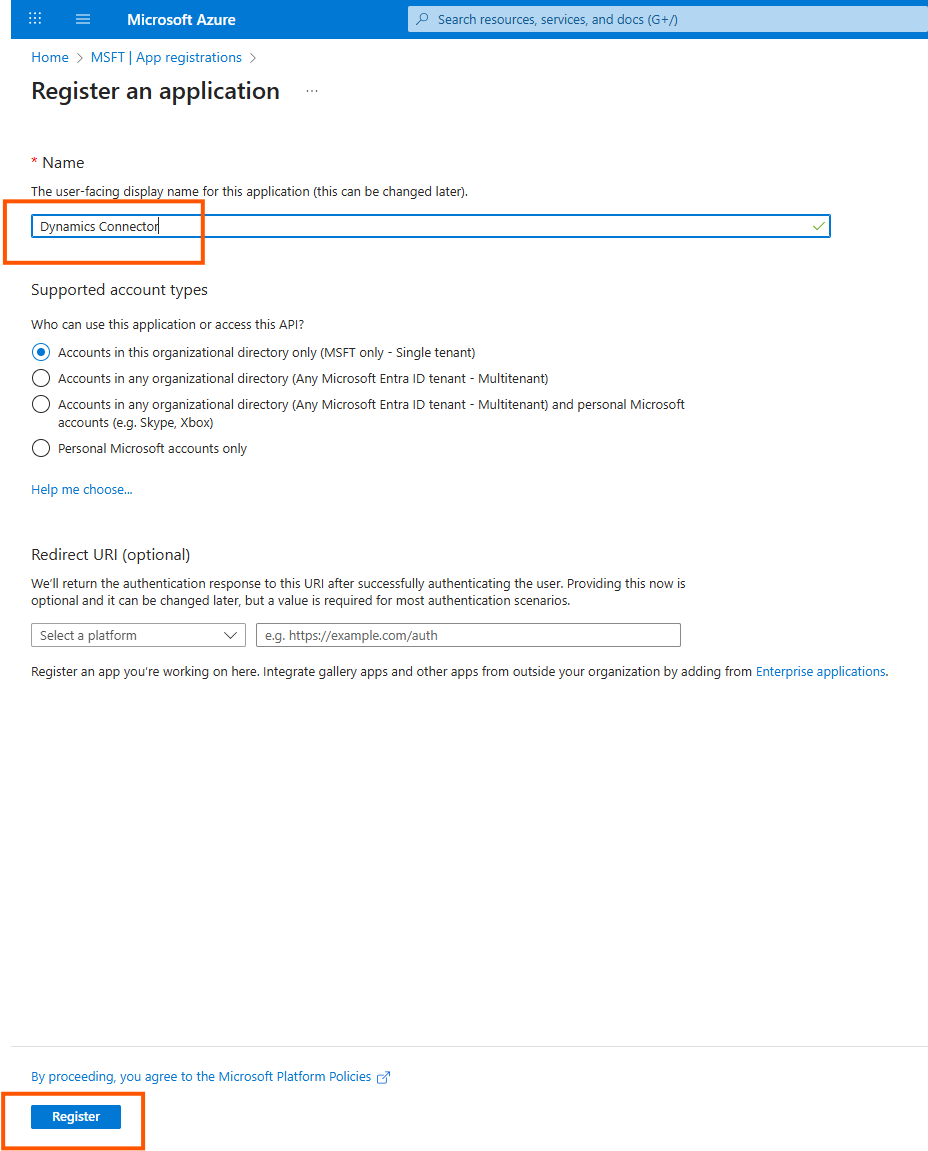
Click on Overview and make a note of the application (client) id and directory (tenant id) which will be used in the configuration below
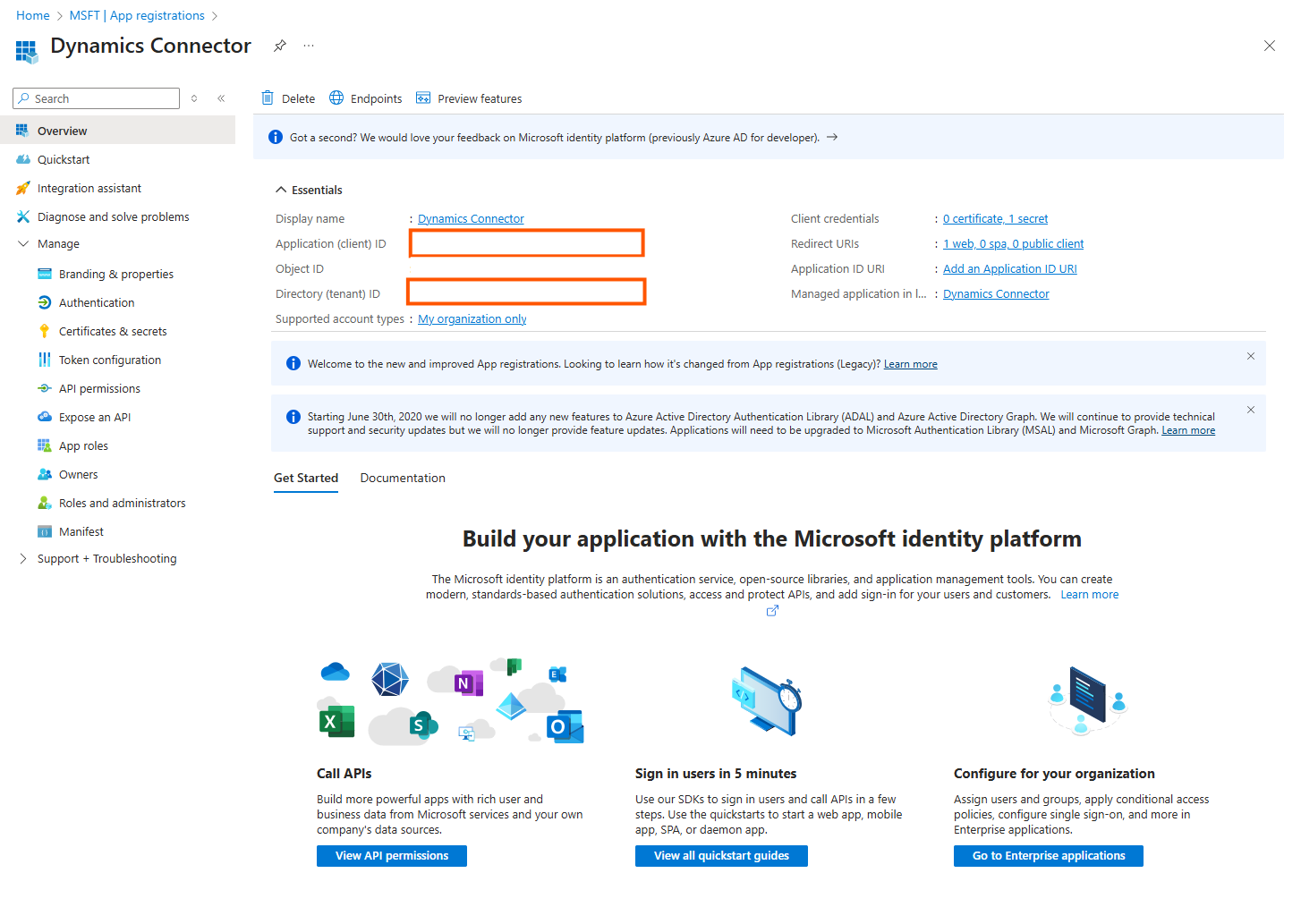
Then click on Authentication
Click on Add a platform
Choose Web
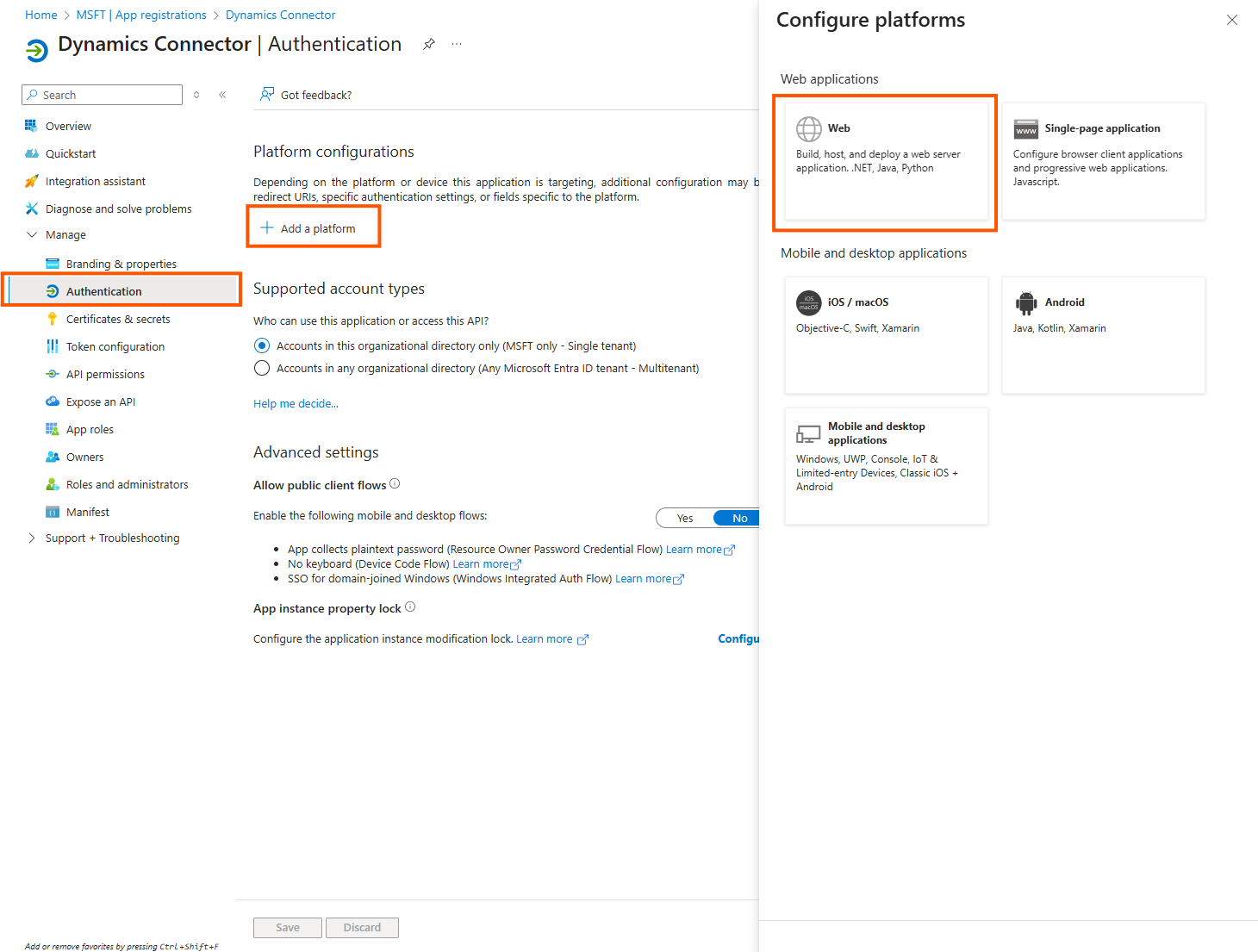
As redirect Url add http://localhost/myapp
(this must be given as such and is ignored later on)-
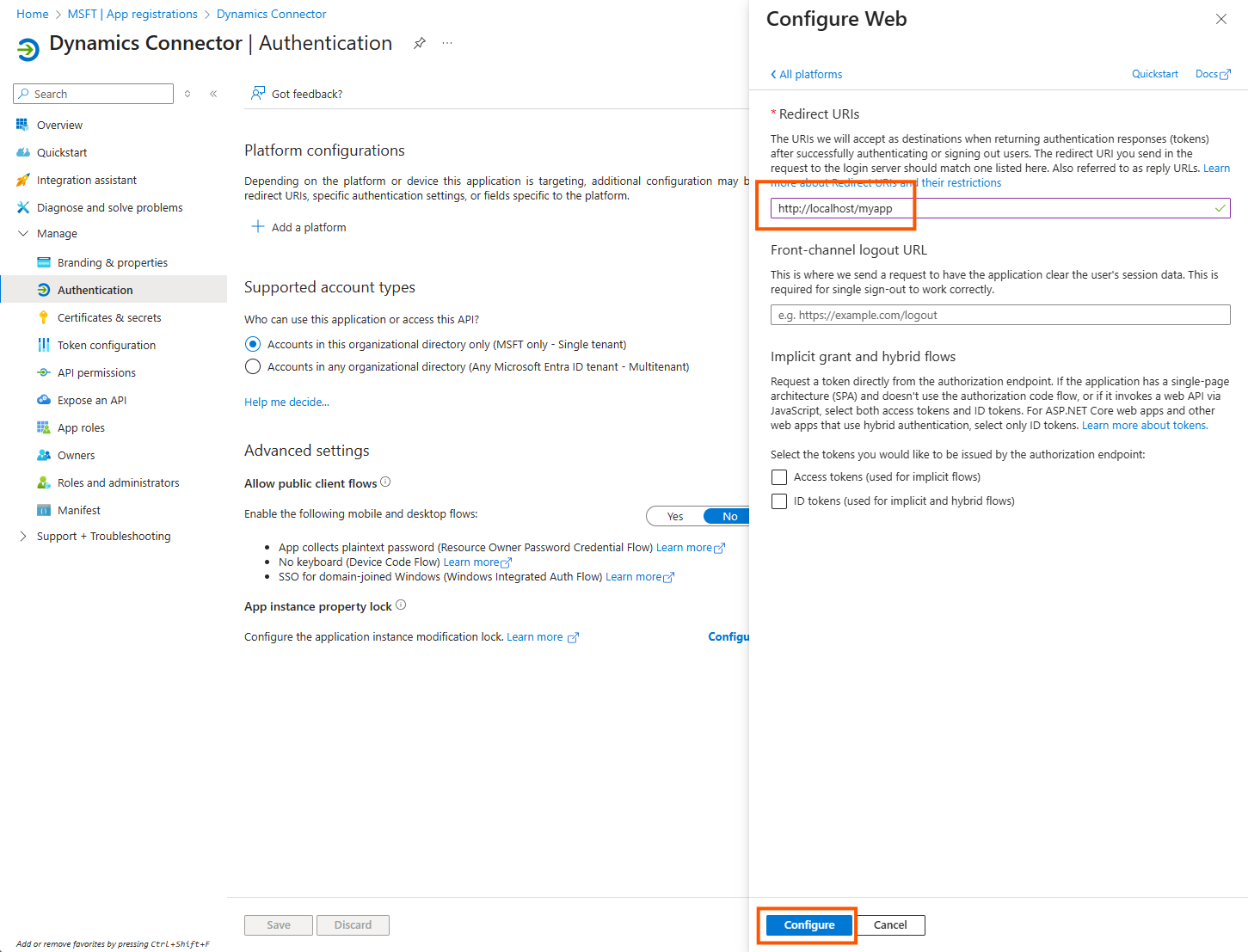
Click on Configure
Open Certificates & secrets
Click on New client secret and generate a new secret.
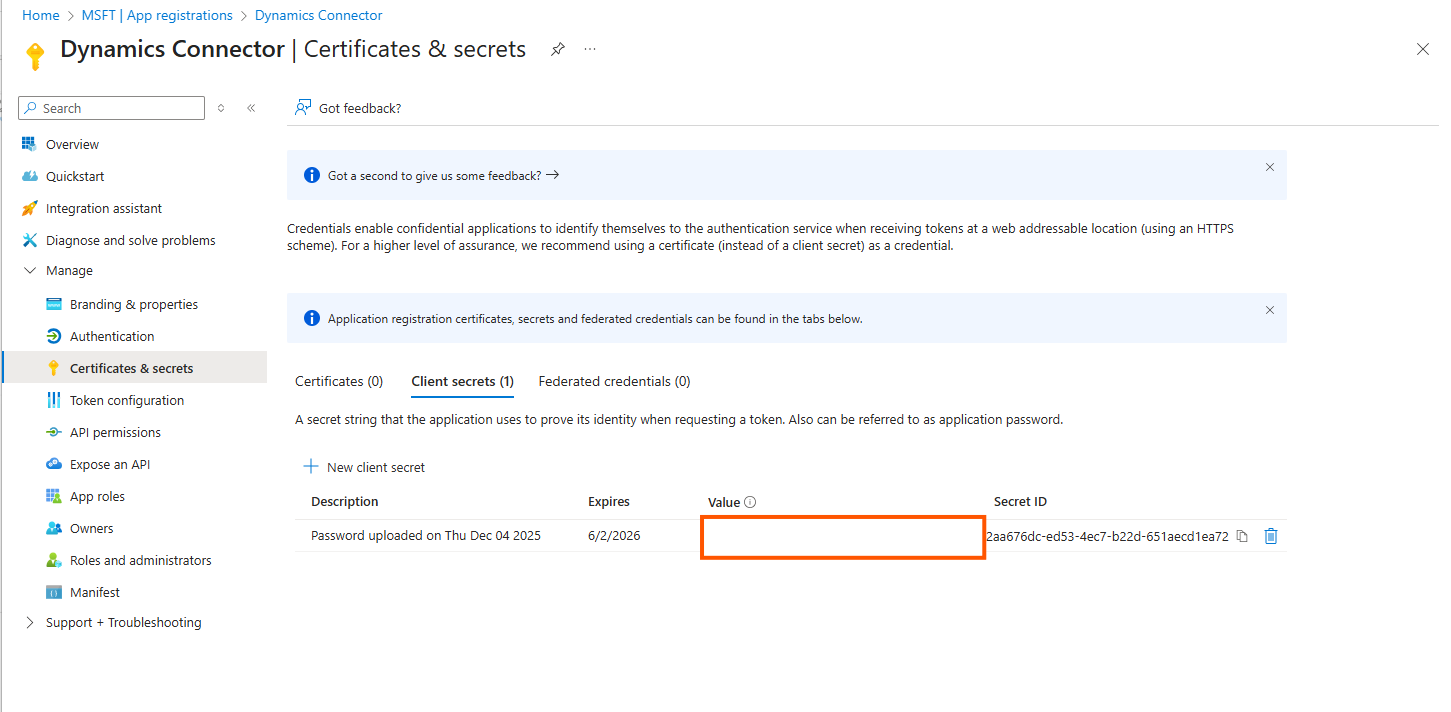
Please choose the expiration date carefully and make a note of it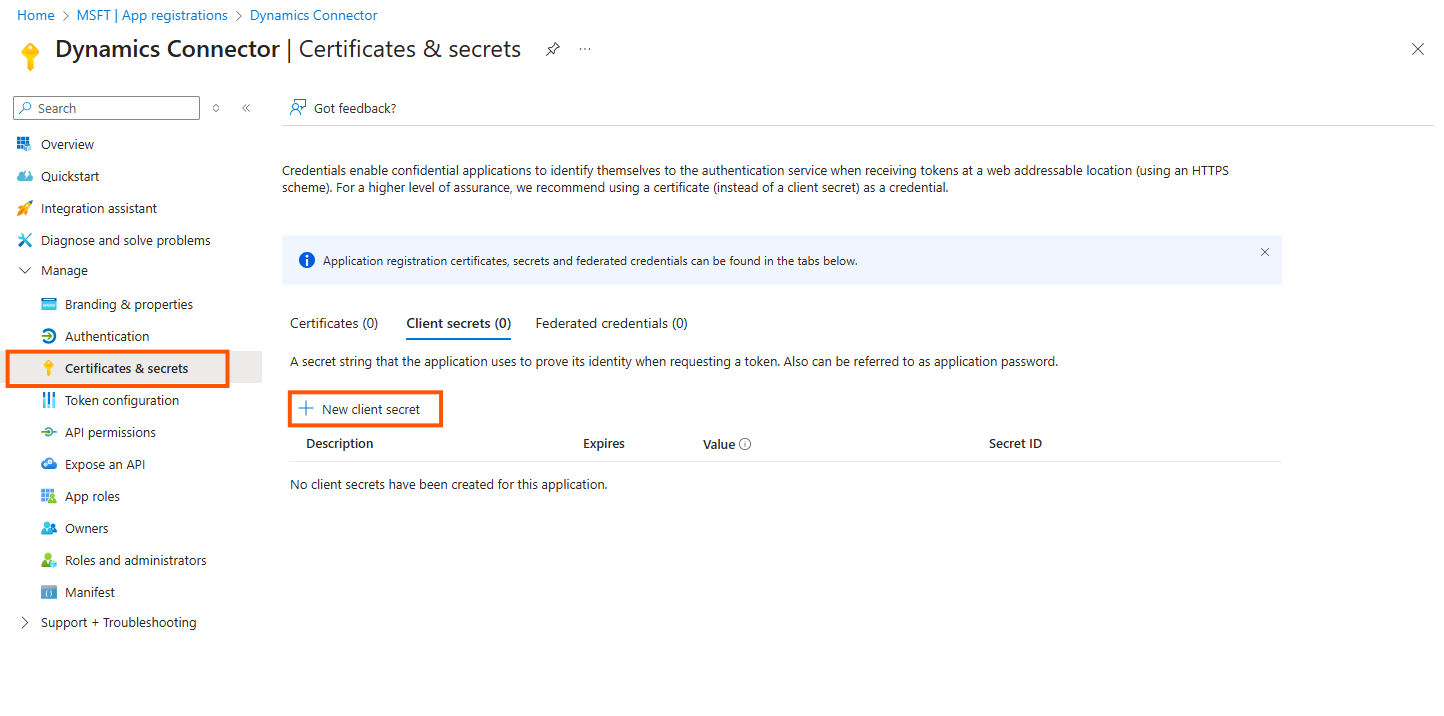
Copy the client secret value ( not the ID) for use during the configuration below
Click on API permissions
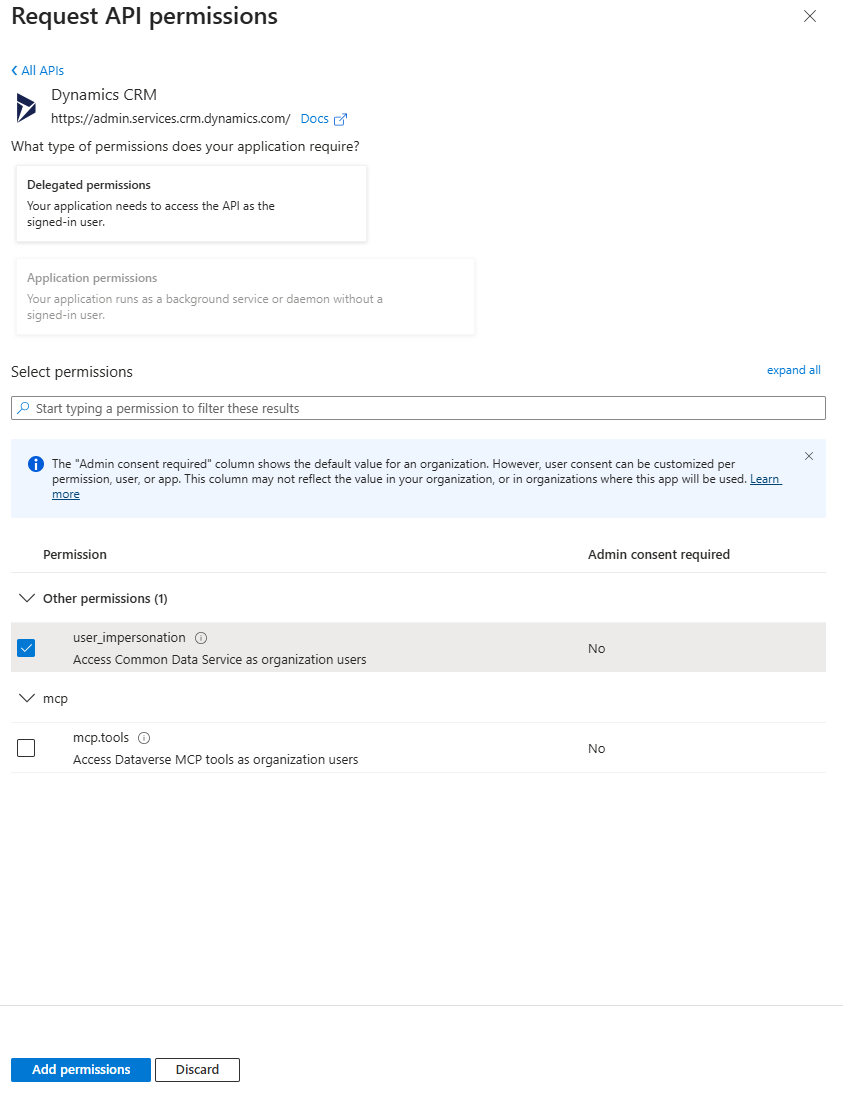
Click on Add a permission
Click on Dynamics CRM
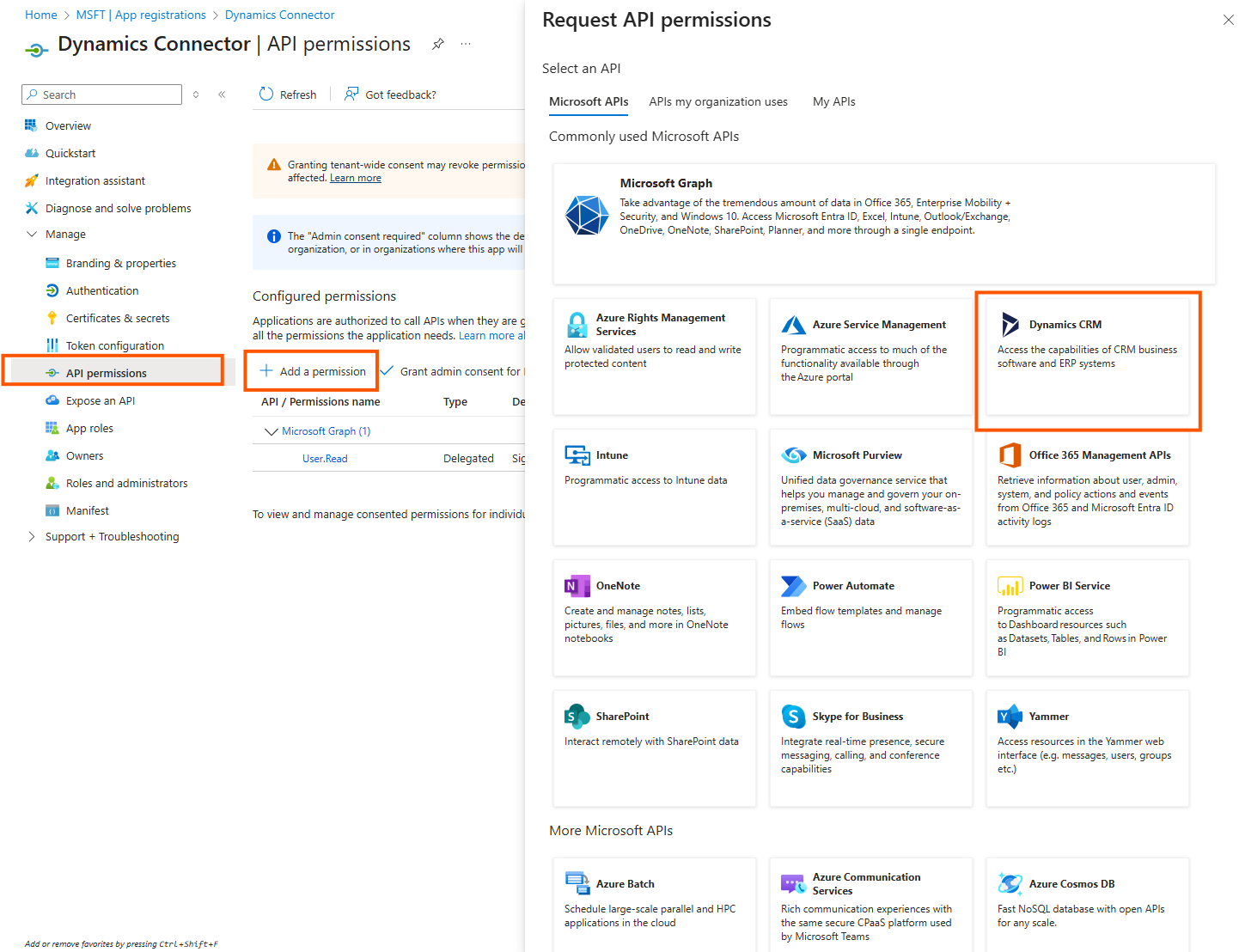
Choose user impersonation
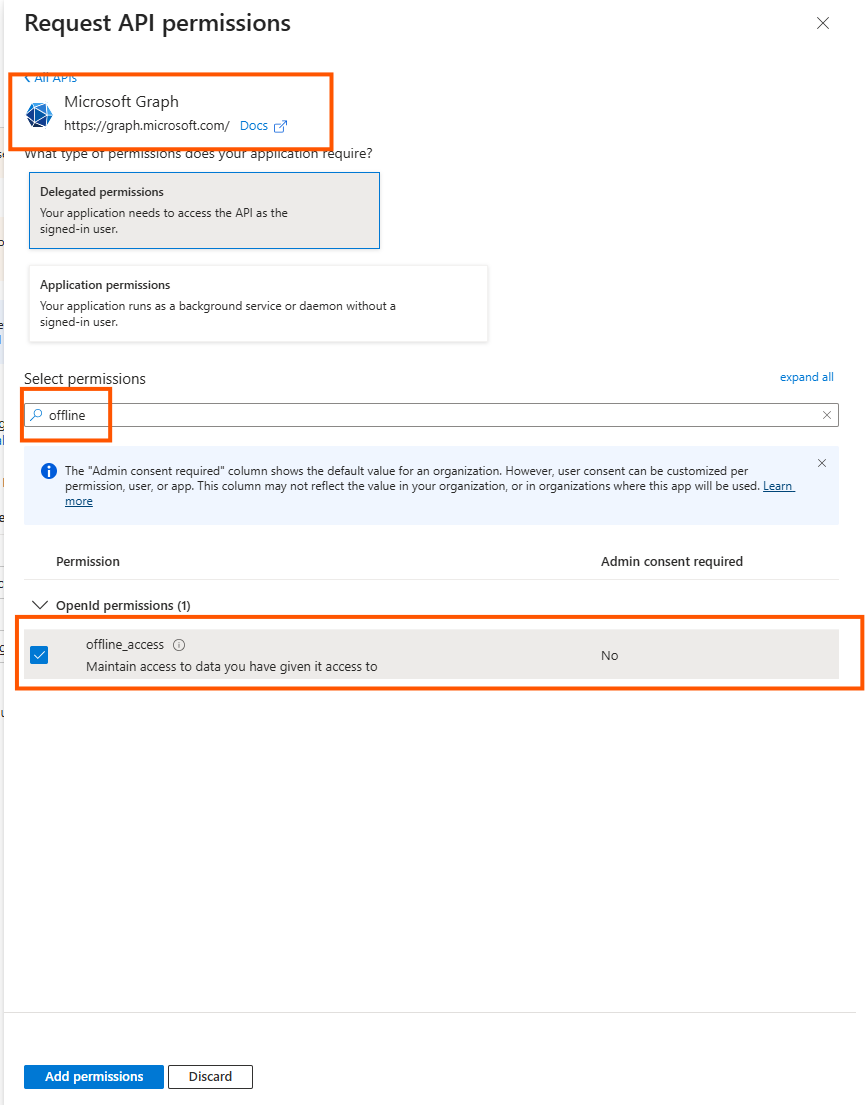
Then add a Microsoft Graph permission
Choose offline_access
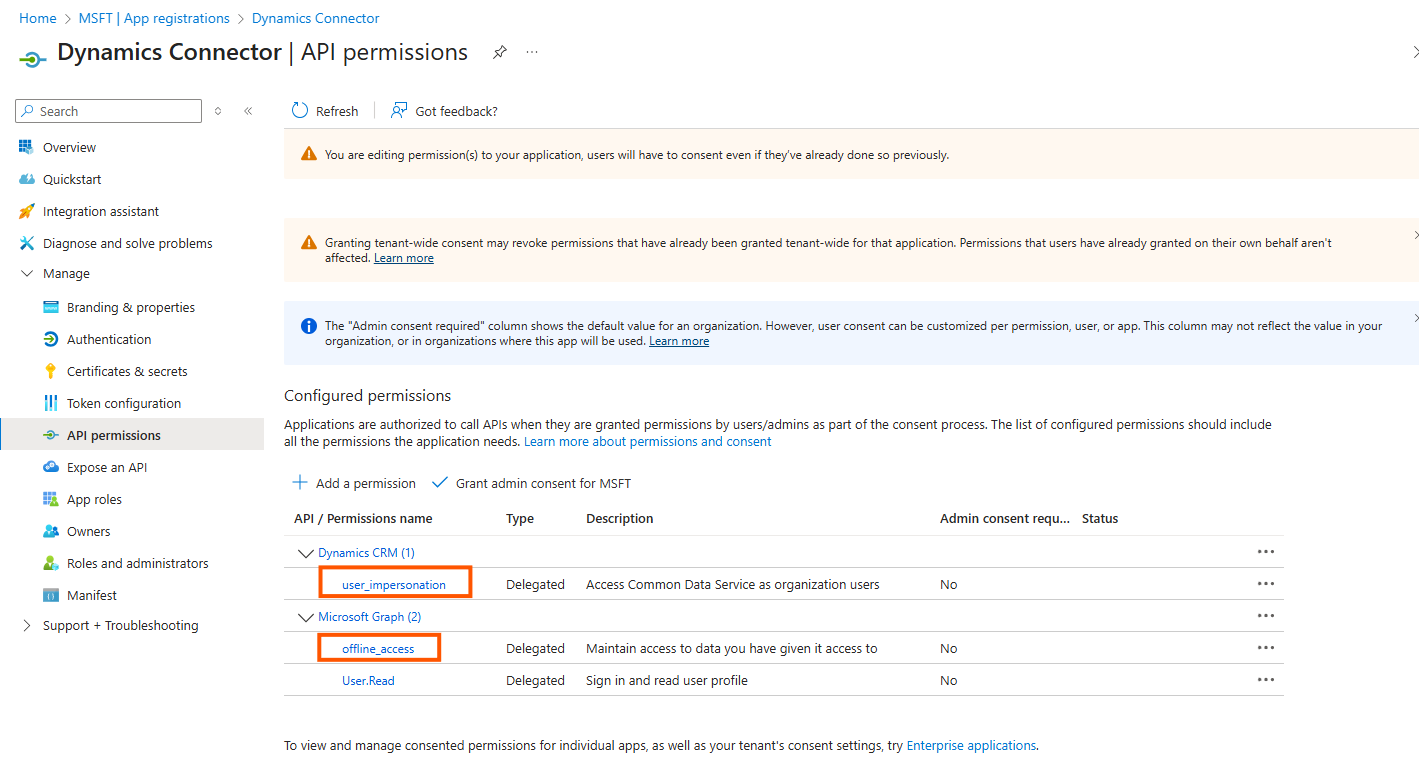
The result is
Acquiring an Access Token
The connector configuration UI supports you with acquiring an access token. However, there is manual work needed for the moment being.
In order to acquire an access token, you need to construct and call the following URL
https://login.microsoftonline.com/<tenantId>>/oauth2/v2.0/authorize?client_id=<clientId>&response_type=code&redirect_uri=http%3A%2F%2Flocalhost%2Fmyapp&response_mode=query&scope=<dynamicsBaseUrl>/user_impersonation &state=40213Then you need to sign in with the crawl user. Please note that a further consent on behalf of the organization is not needed.
This call redirects you to a non-existing page. This is OK, as the URL is important, it looks like
http://localhost/myapp?code=<code>&state=…&session_state=…
Make a note of the code.
Crawl User Permissions
The crawl user (which you just generated the access token for) needs to generally have the following read permissions in Dynamics:
System users
Teams
Team members
Business units
Roles
Role collections
Role privileges
Team roles
User roles
Accounts
Addresses
Annotations
Phone calls
Posts
App modules
Contacts
Contracts
Incidents
KB articles
Knowledge articles
Leads
Opportunities
Sales orders
Content Source Configuration
The content source configuration of the connector comprises the following mandatory configuration fields.
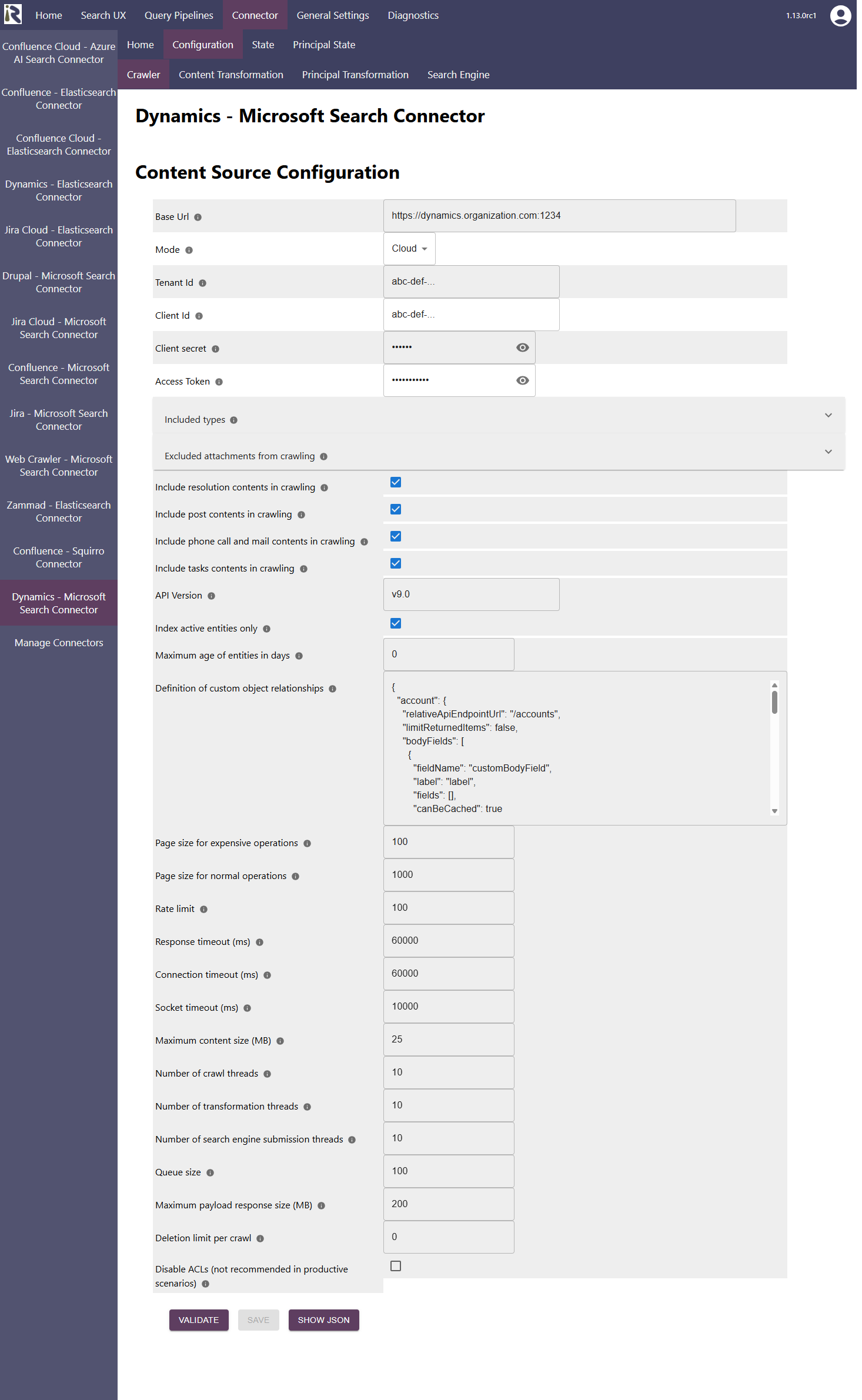
Base URL. This is the root url of your Dynamics instance. Please add it without trailing slash
Mode: Please choose cloud to index a Dynamics 365 cloud instance.
Tenant id: This is the tenand id as has been noted in the Entra Id app registration above
Client id: This is the client id as has been noted in the Entra Id app registration above
Client secret: This is the secret which was generated in the Entra Id app above.
Access Token. This is the access token which was generated in the step above.
If you are unsure how to construct the URL which is mentioned above, then the info-dialog provides the URL according to your configuration.
Please note that this token is valid for just 10 minutes. Once you click on validate, the access token can be left as is, as the connector will generate a new access token, as well as a refresh token. Both tokens will be refreshed automatically by the connector, whenever the connector runs.
If you generated a new access token (with the steps above), then you can simply add it here. Once you click on validate, this token will be used to generate new access and refresh tokens.
Please note that also the refresh token will expire after some time (90 days for web applications). This means that the connector must run more often. We recommend a daily run so that this token does not expire.
Included types. This is a list of Dynamics Entities, which are included in a crawl. Indirectly, each entity is enriched, if applicable, with associated posts, notes, annotations or incident resolutions. The supported entity types are
accounts,incidents,contacts,contracts,kbarticles,knowledgearticles,leads,opportunities,salesorders.Excluded attachments: the file suffixes in this list will be used to determine if certain documents should not be indexed, such as images or executables.
Include post contents in crawling. If this is enabled, associated post entities are extracted and attached to the according parent entities as listed in included types.
Include resolution contents in crawling. If this is enabled, resolution notes are extracted and attached to the associated incident entities.
Include phone call and mail contents in crawling. If this is enabled, associated phone call entities are extracted and attached to the according parent entities as listed in included types.
Include tasks contents in crawling. If this is enabled, associated task entities are extracted and attached to the according parent entities as listed in included types.
Definition of custom object relationships. Here you can specify in a JSON format if you would like to augment the document bodies or document metadata by further fields. The connector can also perform a lookup against directly related objects. The format is the following
{
	"accounts": { /* This is the name of an existing entity type */
		"limitReturnedItems": false, /* determines if the operation should include a lower number of records */
		"extendsExistingType": true, /* This value defines if an existing type (account) should be extended, if set to true it is important that account above matches an existing type. Otherwise the configuration will not be successfully validated. */
		"bodyFields": [
		/* here you can define entity fields which should be included in the document body. Each field can have a label (if not given, it is not shown), a fieldName (mandatory) and a fieldType (integer, double) to format the value accordingly. These fields will be added at the end of the default body. */
			{
				"label": "Account Name",
				"fieldName": "name"
			},
			{
				/* You can also add lookups and lookups in lookups.  */
				"relativeApiEndpointUrl": "/custom_industrycategory", /* is the API endpoint which should be used.  */
				"idFieldInForeignEntity": "industrycategoryid", /* the id filter in the $filter statement, for instance /custom_industrycategory?$filter=industrycategoryid eq value */
				"idFieldInInnerEntity": "_custom_industrycategoryid_value", /* determines the id value to filter in the above statement */
				"fields": [
				/* provides a list of fields which then should be extracted from the matching records, same logic as in bodyFields  */
					{
						"label": "Industry",
						"fieldName": "name"
					}
				],
				"canBeCached": true /* Determines if this lookup will be repeatedly done with the same ids from different top level records. So the connector will build up a cache which will reduce the number of API calls */
			}
		],
		"metadataFields": [
			{
				"label": "Address 1 - Country",
				"fieldName": "address1_country"
			},
			{
			/* You can also add lookups and lookups in lookups.  */
				"relativeApiEndpointUrl": "/custom_industrycategory", /* is the API endpoint which should be used.  */
				"idFieldInForeignEntity": "industrycategoryid", /* the id filter in the $filter statement, for instance /custom_industrycategory?$filter=industrycategoryid eq value */
				"idFieldInInnerEntity": "_custom_industrycategoryid_value", /* determines the id value to filter in the above statement */
				"fields": [
				/* provides a list of fields which then should be extracted from the matching records, same logic as in metadataFields */
					{
						"label": "Industry",
						"fieldName": "ap_name"
					}
				],
				"canBeCached": true /* Determines if this lookup will be repeatedly done with the same ids from different top level records. So the connector will build up a cache which will reduce the number of API calls */
			}
		]
	},
	"customentity": {
		"limitReturnedItems": false, /* determines if the operation should include a lower number of records */
		"extendsExistingType": false, /* This is a new content type, you need to specify more information below.  */
		"relativeApiEndpointUrl": "/customentity", /* is the API endpoint which should be used.  */
		"modifiedOnField": "modifiedon", /* Defines the modifiedon date field. Used for filtering  */
		"idField": "customentity_id", /* Defines the idField of this entity  */
		"applicationPermissionRole":"prvReadCustomEntityRole",/* Permission role for this entity type for security trimming */
		"titleField": "name", /* Defines the title field*/
		"hasAttachments": false, /* If this type has annotations, set it to true  */
		"parentTitle": "Custom Entity", /* Defines the parentTitle metadata field */
		"parentType": "customentity", /* Defines the parentType metadata field */
		"entityType": "customentity", /* Defines the entity type, which is used in the search result click URL  */
		"itemType": "Custom Entity in Human Readable Form", /* Defines the itemType metadata and should be human readable */
		"bodyFields": [
		/* here you can define entity fields which should be included in the document body. Each field can have a label (if not given, it is not shown), a fieldName (mandatory) and a fieldType (integer, double) to format the value accordingly */
			{
				"fieldName": "fieldName1"
			},
			{
				"label": "Label",
				"fieldName": "fieldName2"
			},
			{
				"relativeApiEndpointUrl": "/lookup",
				"idFieldInForeignEntity": "lookupid",
				"idFieldInInnerEntity": "_llokupid_value",
				"fields": [
					{
						"label": "Another Label",
						"fieldName": "name"
					}
				],
				"canBeCached": true
			}
		],
		"metadataFields": [
		/* here you can define entity fields which should be included in as metadat.
		Each field must have a label (the field name in the search schema), a fieldName (mandatory, a fieldName of the entity) and an optional fieldType (integer, double) to format the value accordingly */
			{
				"label": "Metadata Label",
				"fieldName": "fieldName3",
				"fieldType": "integer" /* example for a field which must be interpreted as an integer */
			},

			{
				"label": "Metadata Label",
				"fieldName": "fieldName4",
				"fieldType": "double" /* example for a field which must be interpreted as an double. Doubles are formatted with two decimals */
			},
			{
				"relativeApiEndpointUrl": "/lookup", /* is the API endpoint which should be used.  */
				"idFieldInForeignEntity": "lookupid",
				"idFieldInInnerEntity": "_lookupid_value",
				"fields": [
					{
						"label": Metadata Label",
						"fieldName": "fieldName"
					}
				],
				"canBeCached": true /* Determines if this lookup will be repeatedly done with the same ids from different top level records. So the connector will build up a cache which will reduce the number of API calls */
			}
		]
	}
}
API Version. Please add the API version here which should be used by the connector. The connector then connects against <baseUrl>/api/data/<api version>/…
Index active entities only. Defines whether only (top level) entities with statuscode=1 should be indexed.
Filter for resolved incidents: if enabled, only resolved incidents are indexed. Otherwise, all (active) incidents are indexed.
Maximum age of entities in days. Defines the oldest records (top level entities) to be indexed. This value is calculated based on the modifiedon fields. Records which move out of this window are deleted in the next full scan or recrawl.
Index active entities only. Defines if the connector should filter the main entities (as given above) by statuscode=1 or not.
Maximum age of entities in days. Defines the maximum age for indexing of the main records (as given above). If you do not want to filter out old records, set this value to 0.
If a value > 0 is given, only records which have modifiedon > crawl start date - given days will be indexed. Older records will be deleted during the next full scan or recrawl.Rate limit. This determines how many HTTP requests per second will be issued against Dynamics 365.
Response timeout (ms). Defines how long the connector until an API call is aborted and the operation be marked as failed.
Connection timeout (ms). Defines how long the connector waits for a connection for an API call.
Socket timeout (ms). Defines how long the connector waits for receiving all data from an API call.
The general settings are described at General Crawl Settings and you can leave these with its default values.
After entering the configuration parameters, click on validate. This validates the content crawl configuration directly against the content source. If there are issues when connecting, the validator will indicate these on the page. Otherwise, you can save the configuration and continue with Content Transformation configuration.
Recommended Crawl Schedules
Content Crawls
The connector supports incremental crawls. These are based on sorting as part of the Dynamics APIs, which is very limited and will generally only detect new entities but often not changed entities. Deletions are not detected in this mode at all. Incremental crawls should run every 15 minutes.
Due to the limitations of the incremental crawls, we recommend to run a Full Scan Crawl every few hours or daily.
For more information see Crawl Scheduling .
Principal Crawls
Depending on your requirements, we recommend to run a Full Principal Scan every day or less often.
For more information see Crawl Scheduling .