Documentation
- Getting Started
- Deployment

- Technical Prerequisites
- Data Privacy and Routing
- Administration
- Enterprise Search Connectors
- Managing Connectors
- Connector Home View
- Sources
- Content Transformation
- ACL Assigner
- Adjustable Text Extractor
- Data Logger
- Document Classifier
- Document Preview Generation
- Document Splitter
- Document Translation
- Html Token Remover
- Metadata Assigner
- Metadata Extractor
- Metadata Mapper
- Text Extractor
- Vectorizer and Embeddings
- LLM Specific Configurations - Content Transformers
- Security Transformation
- General Crawl Settings
- Performance Considerations
- Crawl Modes
- Crawl Scheduling
- Standard Schema
- State View
- Principal State View
- AI and Query Pipelines
- Search Engines
- UI, MCP, Agents and Bot Integrations
- Backup and Restore Concept
- Software Updates and Upgrade
- Releases and Release Notes
LLM Specific Configurations - Content Transformers
In many content tranformer configurations settings for Large Language Models can be configured. This page summarizes the settings.
Open Llama Configuration
Specify the URL
For embeddings
Embedding model: here you can provide the name of the embedding model, you want to use. For example mxbai-embed-large
You can also specify an embedding dimension. A good default value is 1536 which all of our proposed schemas use.
For completions
Choose a completion model
Use authentication. If enabled, the Suite can use basic authentication for communicating with the embedding endpoint. Please provide an according username and password.
Public keys for SSL certificates: this configuration is needed, if you run the environment with self-signed certificates, or certificates which are not known to the Java key store.
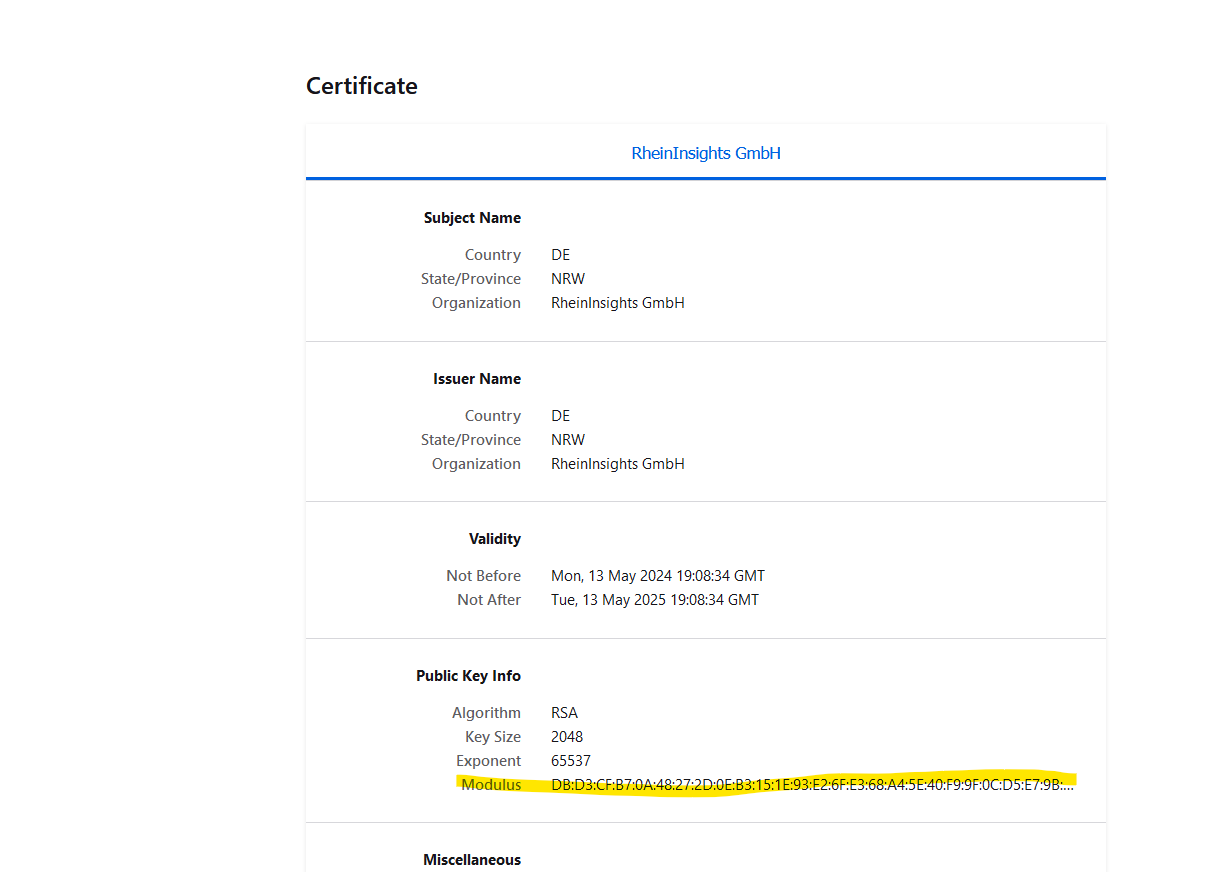
We use a straight-forward approach to validate SSL certificates. In order to render a certificate valid, add the modulus of the public key into this text field. You can access this modulus by viewing the certificate within the browser.
Azure OpenAI GPT Configuration

GPT Endpoint: Offer the endpoint such as <https://<baseUrl>>.openai.azure.com/openai/deployments/<deploymentName>/chat/embeddings?api-version=<version>
Password: here please add your API key which you can configure in the OpenAI configuration in the Azure portal.
For embedding, you can also specify an embedding dimension. A good default value is 1536 which all of our proposed schemas use.
LM Studio Configuration
Specify the URL
The transformer only uses the loaded model right now. A specification at request time is not supported.
For embeddings
You can also specify an embedding dimension. A good default value is 1536 which all of our proposed schemas use.
Use authentication. If enabled, the Suite can use basic authentication for communicating with the embedding endpoint. Please provide an according username and password.
Public keys for SSL certificates: this configuration is needed, if you run the environment with self-signed certificates, or certificates which are not known to the Java key store.
We use a straight-forward approach to validate SSL certificates. In order to render a certificate valid, add the modulus of the public key into this text field. You can access this modulus by viewing the certificate within the browser.
VLLM Configuration
Specify the URL
Please note that by VLLM design, the transformer only uses the loaded models
For embeddings
You can also specify an embedding dimension. A good default value is 1536 which all of our proposed schemas use.
Use authentication. If enabled, the Suite can use basic authentication for communicating with the embedding endpoint. Please provide an according username and password.
Public keys for SSL certificates: this configuration is needed, if you run the environment with self-signed certificates, or certificates which are not known to the Java key store.
We use a straight-forward approach to validate SSL certificates. In order to render a certificate valid, add the modulus of the public key into this text field. You can access this modulus by viewing the certificate within the browser.